
What is a meeting room display? Bringing Exchange and Office 365 meetings to the screen
What a meeting room display is, how it works with Exchange and Office 365 integration and how it is managed with AerOS Digital Signage.
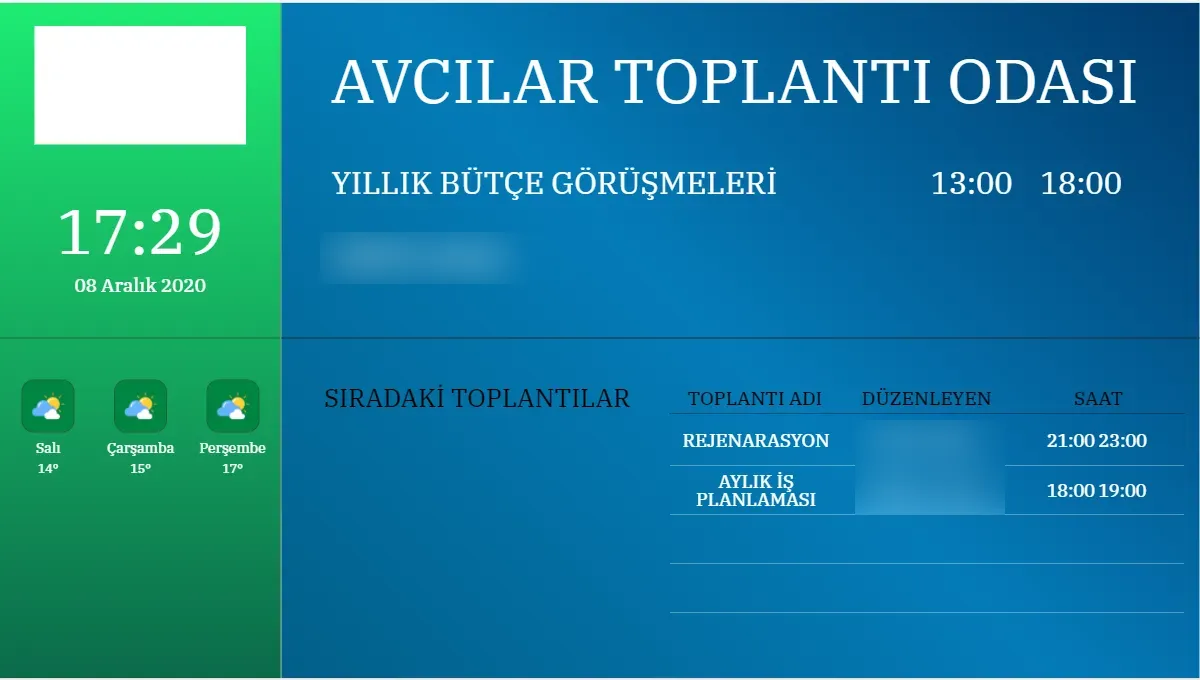
A meeting room display is a digital screen at the door or entrance of a room that shows the title, time, organiser and attendees of the meeting held there. The information can be entered manually or pulled automatically from Microsoft Exchange or Office 365, so the schedule on the screen stays in line with the bookings staff make in their calendars. When there is no meeting, the screen does not sit blank; it shows a predefined content flow.
What problem does it solve?
In offices, hotels and event venues, one of the questions attendees ask most often is which room a meeting is in. Printed lists on the door cannot keep up with last-minute changes, and schedules kept at reception are updated separately from the calendar and soon go out of date. When the meeting room display takes its information from the calendar itself, a room change or new booking reaches the screen without any extra step.
What does the screen show?
In the Meeting Information Screen module of AerOS Digital Signage, the screen can show the meeting room, the organiser, the attendees and details of the meeting. The same module can also be used as a meeting wayfinding screen, for example in a lobby or at a floor entrance to direct attendees to the right room. The screen layout is built in the drag-and-drop scene designer of AerOS Digital Signage; since properties such as background colour, background image, border and shadow can be set without knowing CSS, the meeting display can be designed to match the organisation's visual identity.
How does calendar integration work?
Meeting information comes from two sources. The first is the meeting operations screen in the management panel, where meeting rooms are defined and meeting details are entered manually. The second is calendar integration: the system can be integrated with Microsoft Exchange, Office 365 and Exchange server software that supports data sharing. Once the integration is in place, meeting information is shown on the screens automatically, and staff keep booking rooms in the calendar they already use.
What does the screen show between meetings?
Instead of leaving the screen blank when there is no meeting, a defined flow can be shown. This flow is built with the other AerOS Digital Signage modules: rich text for corporate announcements, images and video for promotion, and news, exchange rates and weather for current information. Because display date, day and time restrictions can be set for every item, an announcement can be scheduled to appear only on certain days and hours.
Use in hotels and event venues
Hotels that offer meeting or event services use the same feature in their meeting and event rooms. Organiser and attendee details appear on the screen automatically, and the hotel's own content is shown in free periods. Planned together with lobby and corridor screens, it both directs guests to the right room and informs them about the hotel's services and events.
Managing the screens
Meeting room displays usually sit next to doors in places everyone can reach, so remote management matters. In AerOS Digital Signage, assigning an operating rule to screens lets devices switch off outside working hours and save energy. Remote control and USB ports can be disabled, and screen orientation, input source, volume and picture mode are adjusted remotely. Users of the management panel are given page access and add, delete and update permissions separately, and you can see which user did what on any record. The reporting screen also shows, daily, weekly and monthly, which content each device displayed during the day, when and how many times.
Summary
A meeting room display is a digital screen that shows a room's schedule at the door or in the lobby, taking it from the Exchange or Office 365 calendar or from manually entered records. Set up correctly, the information stays in line with the calendar, the screen shows corporate content between meetings and devices are managed remotely. AerOS Digital Signage lets you manage the meeting information screen from the same management panel as its news, media and announcement modules.