
How to prepare a freight forwarding quote: revenue and cost items, currencies and the quote-to-invoice flow
Keeping revenue and cost items apart in a forwarding quote shows the margin before the quote goes out and carries the accepted quote into the file and the invoice with the same data. Explained through ECELA's quote wizard.
A freight forwarding quote is made up of the customer and transport mode, the route, the freight and ancillary charge items, and the currency of each item. A sound quote keeps the revenue items charged to the customer separate from the cost items payable to the carrier, the port or the customs broker; this shows the margin before the quote is sent and carries the accepted quote into the operations file and the invoice with the same data. The quote wizard in ECELA, the platform Boran Software offers to freight forwarders, is built on this structure.
The building blocks of a quote
The first thing a quote needs is who is shipping and by which mode: the customer, and air, sea, road or rail. Then comes the route: origin and destination, container type and quantity for sea freight, weight and the estimated time of departure (ETD). Finally, the items that make up the price are entered.
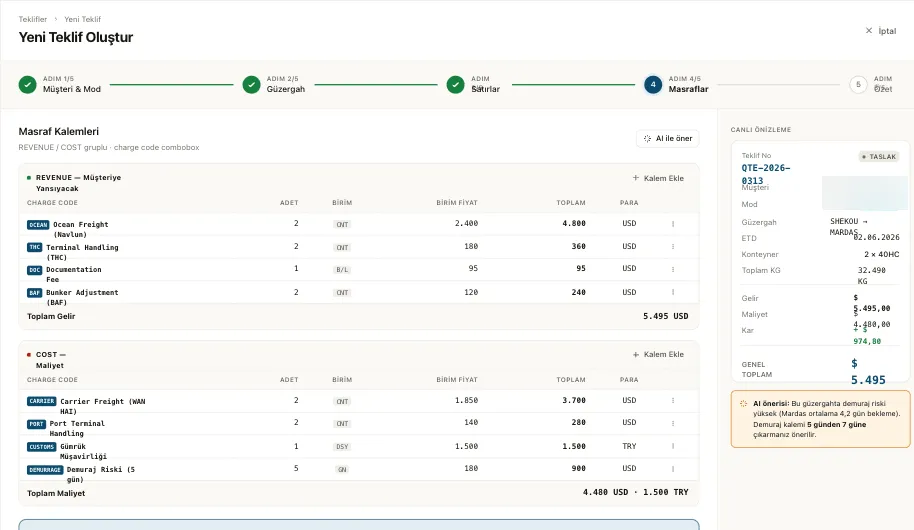
In ECELA, a quote is prepared with a five-step wizard; customer and mode, route, charges and summary are among the steps. The live preview on the right of the wizard instantly summarises everything entered, together with the quote number, route, ETD, containers and total weight.
Keeping revenue and cost apart
The most common mistake in forwarding pricing is mixing the price given to the customer with the price paid to the carrier in the same list. In ECELA's wizard, charge items are entered in two groups: revenue (REVENUE) items charged to the customer and cost (COST) items. Each item is selected with a charge code, and quantity, unit, unit price and currency are entered separately.
In the sample screen, the revenue side of a sea freight quote contains items such as ocean freight, terminal handling (THC), documentation fee and bunker adjustment (BAF); the cost side contains carrier freight, port terminal handling, customs brokerage and demurrage risk. Container, bill of lading (B/L), file or day can be chosen as the unit.
The live preview shows total revenue, total cost and the profit between them together. The sales team can therefore see whether the margin is acceptable before sending the quote to the customer.
Multiple currencies, VAT and withholding
In international transport, revenue and cost may not be in the same currency. Freight may be in US dollars, for example, while customs brokerage is in Turkish lira. ECELA works with USD, EUR and TRY, and in the sample screen the cost total is shown separately in dollars and in lira. Exchange rates and charge codes are managed from the finance menu, and invoices are also prepared in multiple currencies with VAT and withholding calculated.
A status-based quote flow
A quote is not a one-off document but a process: it is drafted, sent, discussed with the customer, and accepted or rejected. In ECELA, quotes move from draft to accepted through a status-based flow, and the list shows the stage of each quote. For critical actions, mandatory or optional approval steps defined by management apply, and who approved what and when is recorded.
From quote to file, from file to invoice
A quote shows its real value the moment it is accepted. In ECELA, an accepted quote becomes an operations file in one click, and the customer, route and items are not entered again. During operations, the bill of lading, customs, demurrage and milestones are followed on the file's timeline. When the file is closed, the costs linked to it move automatically into a draft invoice, and account balances and due dates are updated in real time. This flow prevents a cost that arises during operations from being left off the invoice.
The role of AI
ECELA's wizard has an "AI suggest" button for charge items. In the sample screen, the AI notes that demurrage risk is high on the selected route and suggests increasing the number of days on the demurrage item. The platform's AI layer also extracts cut-off, ETA and container details from incoming emails and offers the next step, such as "Create a quote", as a one-click suggestion. Whether to apply a suggestion is up to the user.
For companies using BoranWise
For companies running modular logistics software on their own servers, Boran Software's BoranWise offers a similar finance logic: invoices can be issued in any currency, reported after conversion into four currencies and transferred to accounting. ECELA, on the other hand, is a browser-based platform that needs no installation and offers this wizard focused on the quote step.
Summary
A good forwarding quote brings together customer and mode, route and item details while keeping revenue and cost apart. ECELA's quote wizard groups revenue and cost items separately with charge codes, shows the margin in a live preview, works with USD, EUR and TRY, and turns an accepted quote into an operations file in one click and the file's costs into a draft invoice at closing. More information: https://ecela.net